
Designing course visibility rules at scale with Enhanced Enrollment Rules
Helping Brightspace admins manage course visibility at scale, saving an at risk client, and increasing usage of Discover and Enrollment Rules.
My Role: Senior Product Designer
1 Product Manager, 1 Dev Manager, 6 Developers
Feb. 2023-Sept. 2023
Background: Brightspace, Discover, and Enrollment Rules
Brightspace is a learning management system used by colleges, universities, associations, corporations, and other large organizations to host, create, manage, and evaluate courses and programs. Discover is a tool within Brightspace (a large learning management system) that enables learners to self-enroll in courses. Enrollment rules within Discover is a workflow that manages the visibility of Discover courses. Enrollment rules use custom attributes, roles, and permissions in Brightspace to decide who can see which courses in Discover.
Enhanced Enrollment Rules: Project Summary
Brightspace admins were managing enrollment rules one course at a time, which made Discover difficult to scale for clients with large course catalogs. I redesigned the workflow into a reusable rules experience, allowing admins to create a rule once and apply it across multiple courses. The work required balancing a major client renewal risk, admin mental models, and backend constraints around how rules were connected to courses. After launch, the feature helped retain an at-risk client and made Discover easier to manage for education providers operating at scale.
My Process
My process for Enhanced Enrollment Rules followed Align, UX Research, Explore, Make, and Ship. I used Align to understand the problem, existing workflow, and numerous technical constraints, UX Research to test whether admins understood the shift from course-level rules to reusable rules, Explore to work through key workflow decisions, negotiatie with developers on complicated technical feasibility, and be meticulous about front-end decisions, Make to design a scalable rule-building experience and work with developers to implement it, and Ship to get it live and see the results.
Align: Applying rules to many courses was hard and technical constraints were high
The current enrollment rules workflow for Discover was great for setting detailed visibility rules on courses, but rules didn't save across courses, they had to be built one at a time. If a school had 50 Math courses, they had to recreate the same rule 50 times. For clients with thousands of courses in Discover, that was impossible to manage.
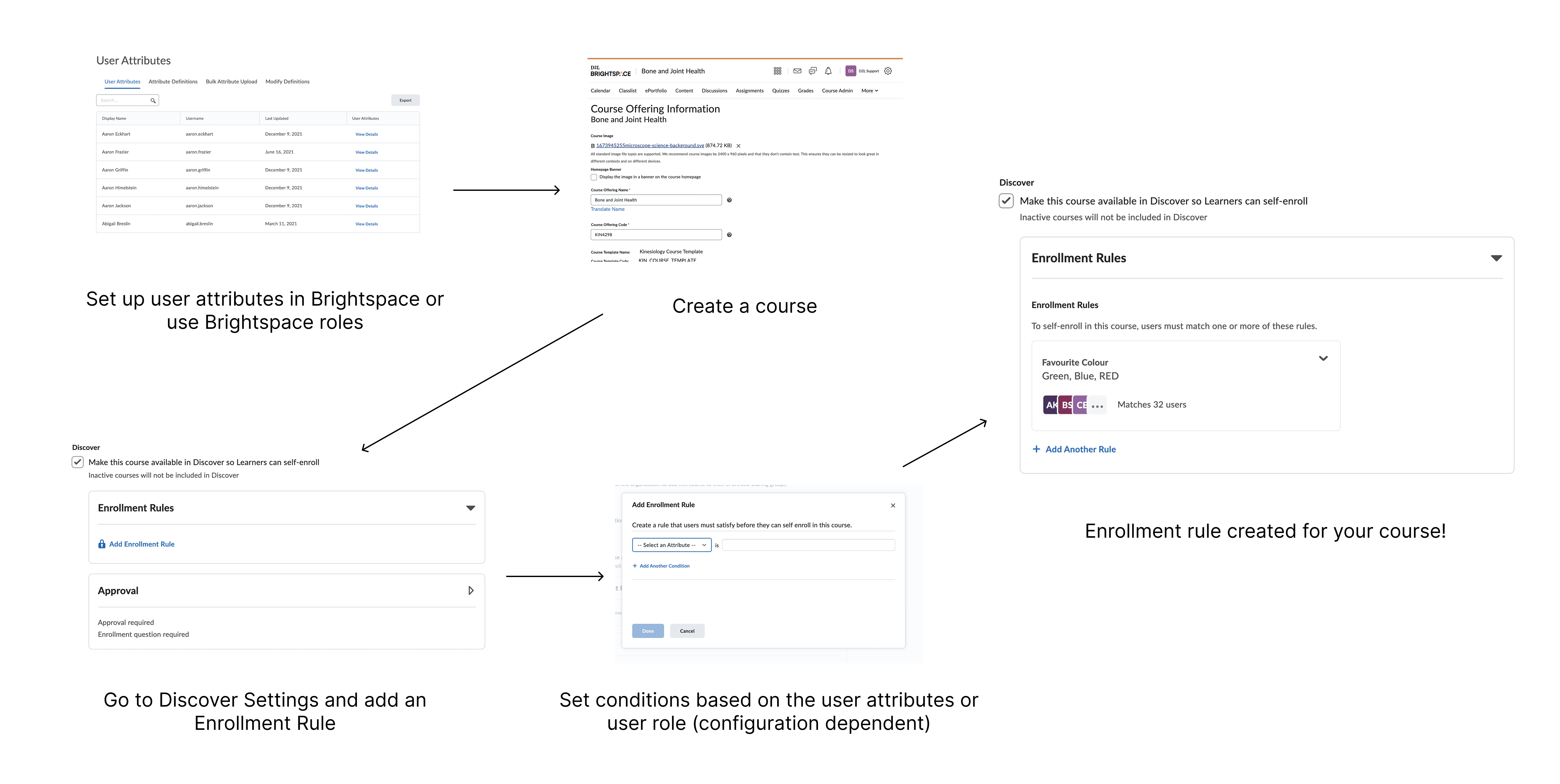
Steps: Set up user attributes in Brightspace or use Brightspace roles, create a course, go to the Discover settings of that course and add an Enrollment Rule, set conditions based on user attributes or role, then create the rule!
This part of the problem was straightforward and aligned on within the first meeting or two, but there were bigger technical constraints that made solving this problem tricky:
Adding rules during course creation or editing wasn't possible. I investigated the idea of a simple "add a rule" function on bulk course creation, but quickly discovered the experience was undergoing a complete redesign and re-architecture as part of a separate multi-year project that wouldn't be delivered in time for the client’s deadline. So instead of “adding rules to courses”, we had to flip the model and work with “adding courses to rules.”
Storing rules was complicated. Enrollment rules were made up of: Conditions that checked something about a user, like their role, department, or a custom attribute, rules which grouped conditions together, and entitlements that grouped rules and connected them courses
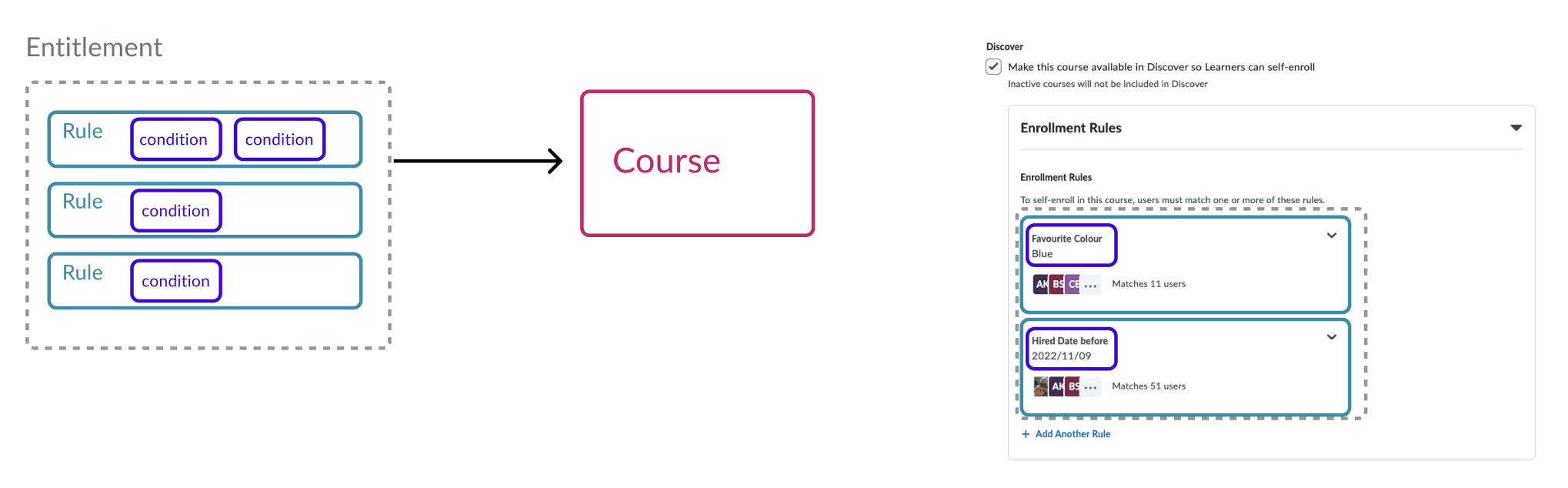
A diagram I used to show how rules were stored in Brightspace.
The sticking point was that a course could only be connected to one entitlement. For adding rules one course at a time this worked, but it was a big constraint once we started designing reusable rules outside of the course setup flow.
And finally, one more non-technical constraint: I didn't know enough about how admins actually used Discover and enrollment rules. I didn't know general admin workflows, how admins thought about Enrollment Rules, or how they would interpret a new Enrollment Rules design.
The Result: The solution we aligned on was an "Enrollment Rules" area in Discover where a user could create a rule and add courses to it. Development would start to investigate the technical constraints and I would kick off a quick research study with our user research team to do a conceptual walkthrough with real Brightspace admin users.
Exploration & Research (Part 1): Using a low fidelity prototype to test a conceptual model
I started with low-fidelity workflows of how a rule could be created, applied to courses, edited, and deleted.
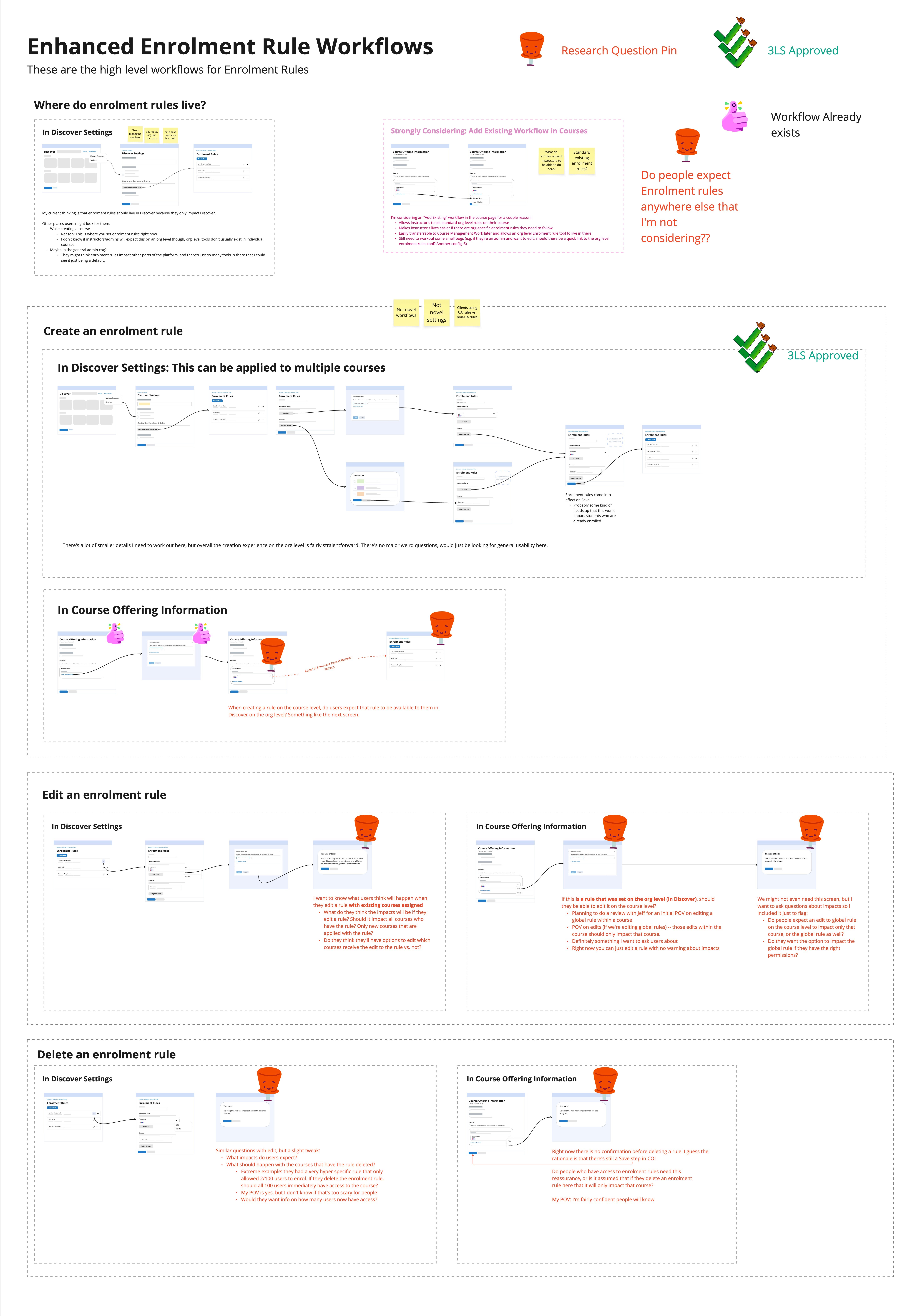
My "low-fidelity flow" planning board. The pins were areas where I had questions and the board itself is organized from "most confident in design direction" (top workflow) to least confident (bottom workflows).
After that, I used my low/mid-fidelity library of our design system called "Twilight". I created Twilight for the design team to quickly build low/mid fidelity prototypes for feedback on concepts, not polished UI. Then I partner with the user research team to run sessions with external Brightspace client admins to see how they interpreted the flow and language.
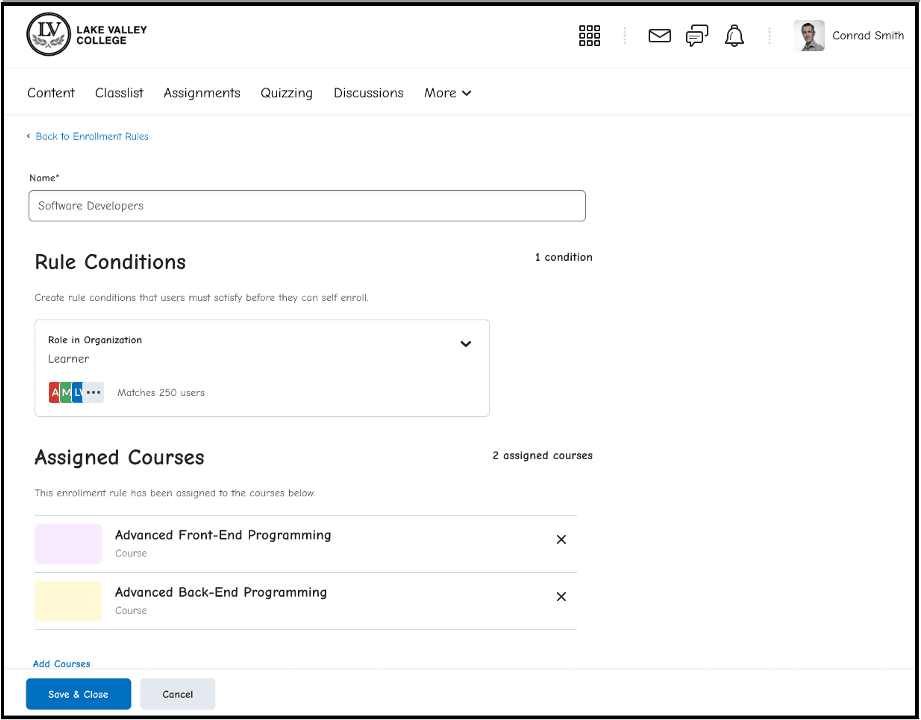
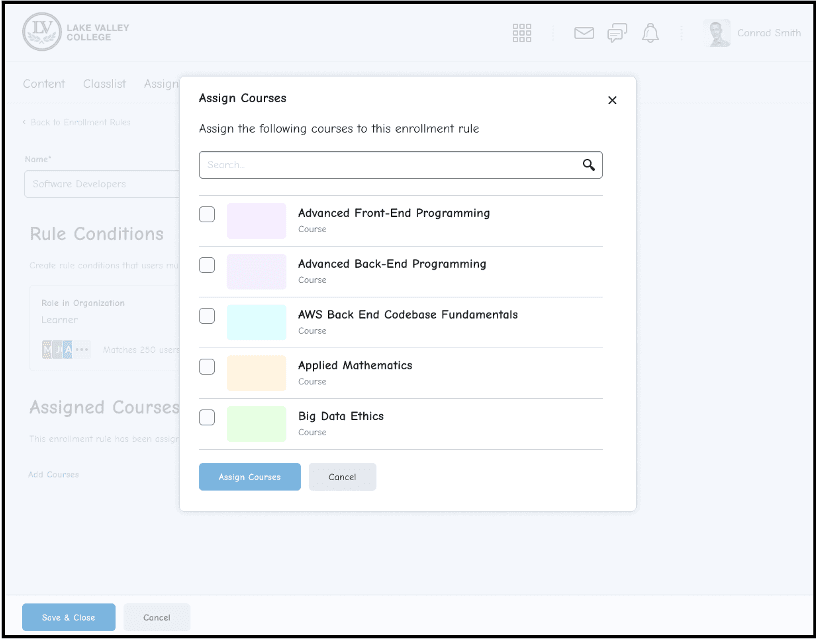
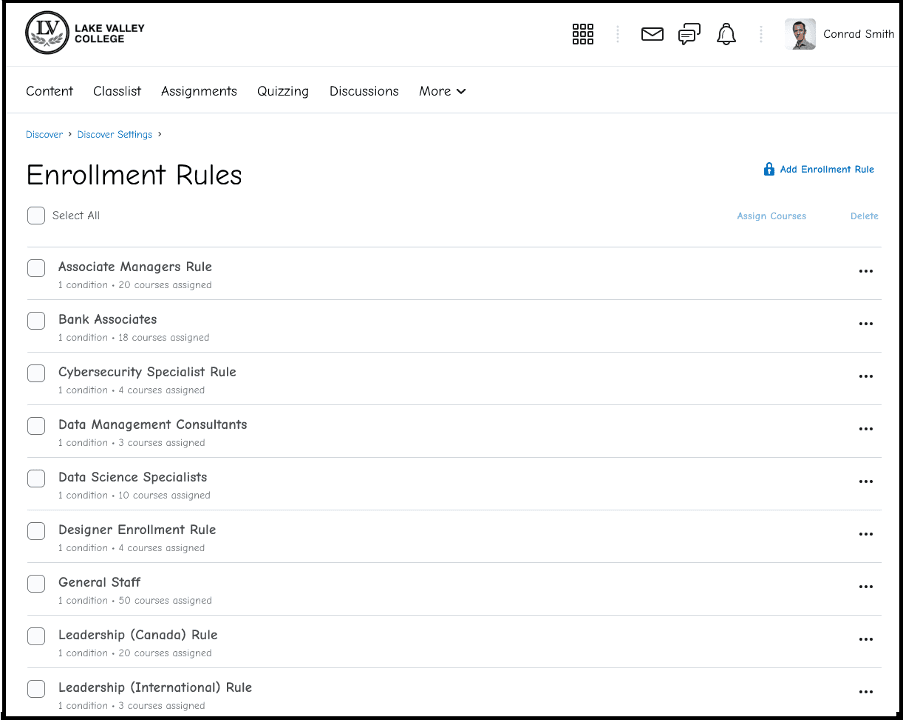
A slideshow of the early prototype that we tested with Brightspace admin users.
Some examples of findings that came out of the conceptual walkthrough:
Finding: Language was very important for admins. For example, calling the section where a user creates conditions “Rule conditions” caused confusion. People didn't know what to expect in this section. When we called it conditions halfway through the study, it resonated better.
Design Changes: Language was very carefully chosen. Rule conditions, courses, and all copy explaining functionality was carefully crafted based on the study. In this example on the right, we changed "Rule conditions" to "Conditions" halfway through the study, which resonated well with the remaining participants.
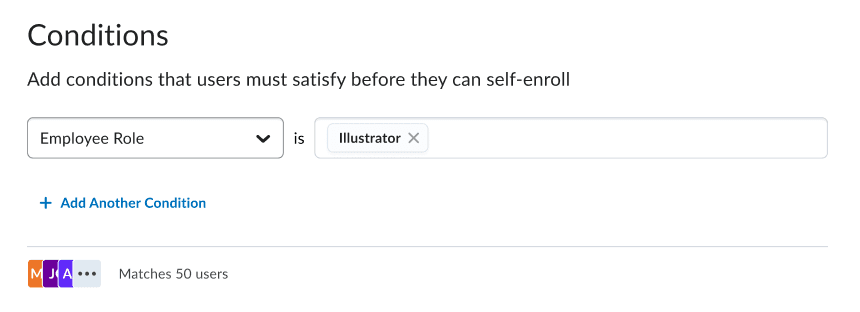
This section was originally called "Rule Conditions", but I changed it to "Conditions" after the study.
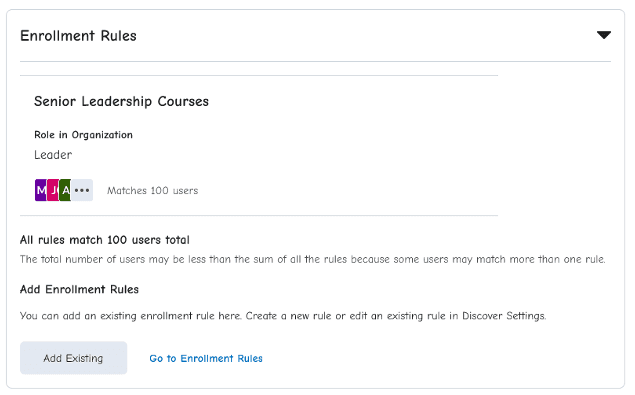
The addition of the "Add Existing" button.
Additional findings omitted due to confidentiality.
The Result: The conceptual walkthrough gave me a better understanding of how Brightspace admins interpretted enrollment rules and how they used Discover. The findings from this study allowed me to move forward more confidently into a high-fidelity design.
Exploration (Part 2): Addressing technical constraints and development pushback
Before I finished the user research, I brought my mid-fidelity prototype to the development team for an early feasibility check. Their reaction was not good. They told me a new workflow plus changes to entitlements would blow up our timeline (they needed double the time, at least). I left those conversations wondering if I had to start over.
With research insights in one hand and severe technical constraints in the other, I went back through the design inch by inch.
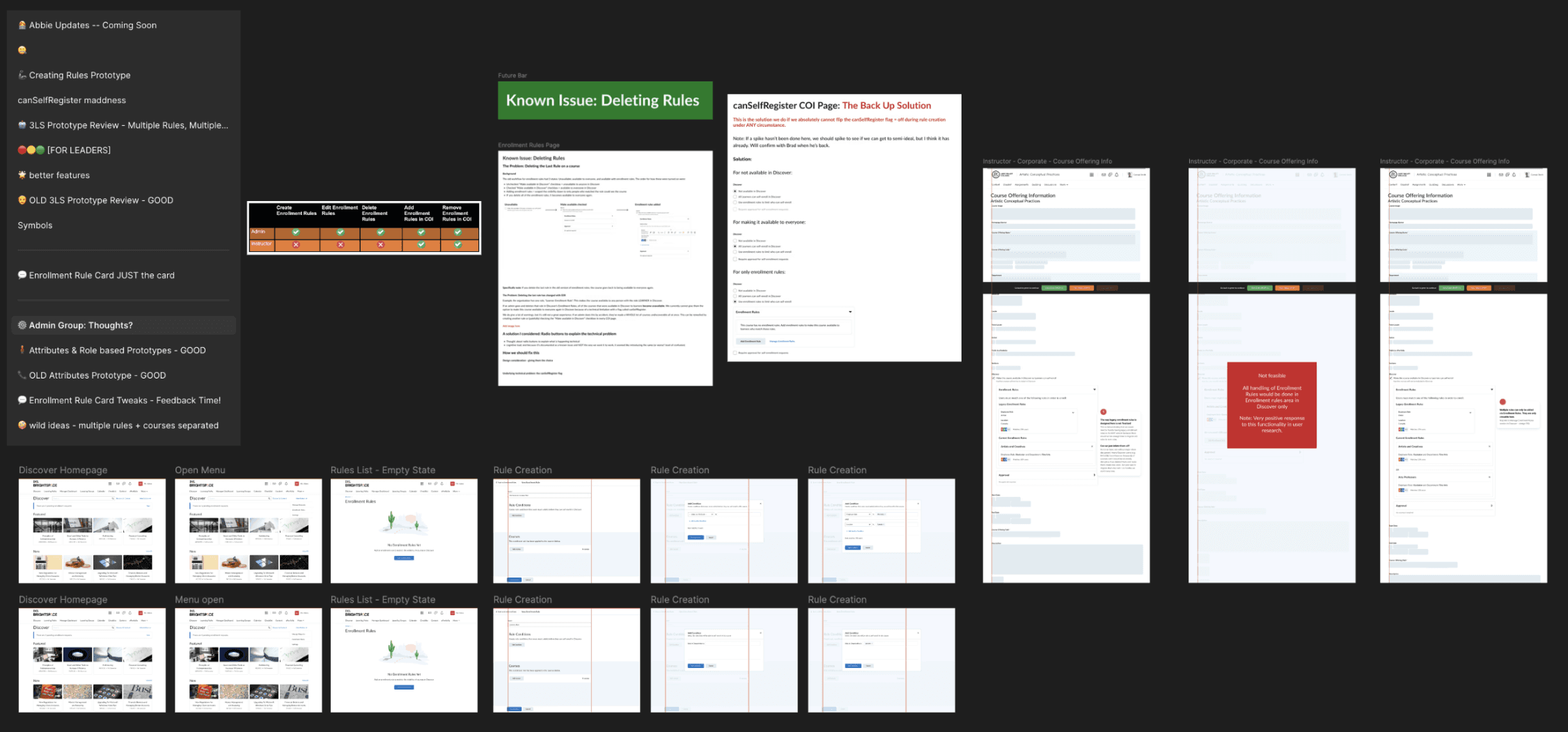
There was a big technical constraint around how to deal with the visibility of courses after deleting a role. I spent a lot of time weighing the pros and cons of different options.
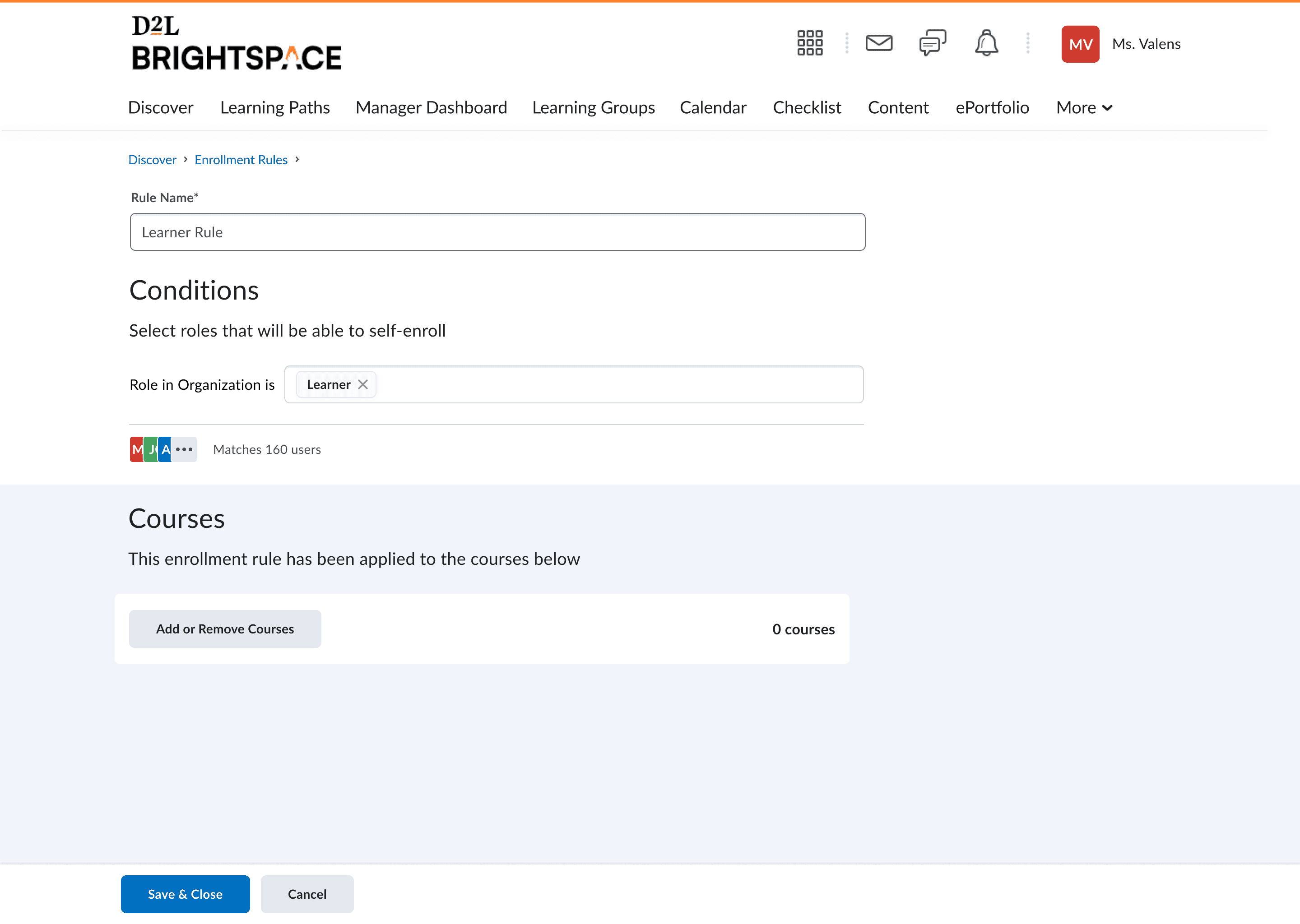
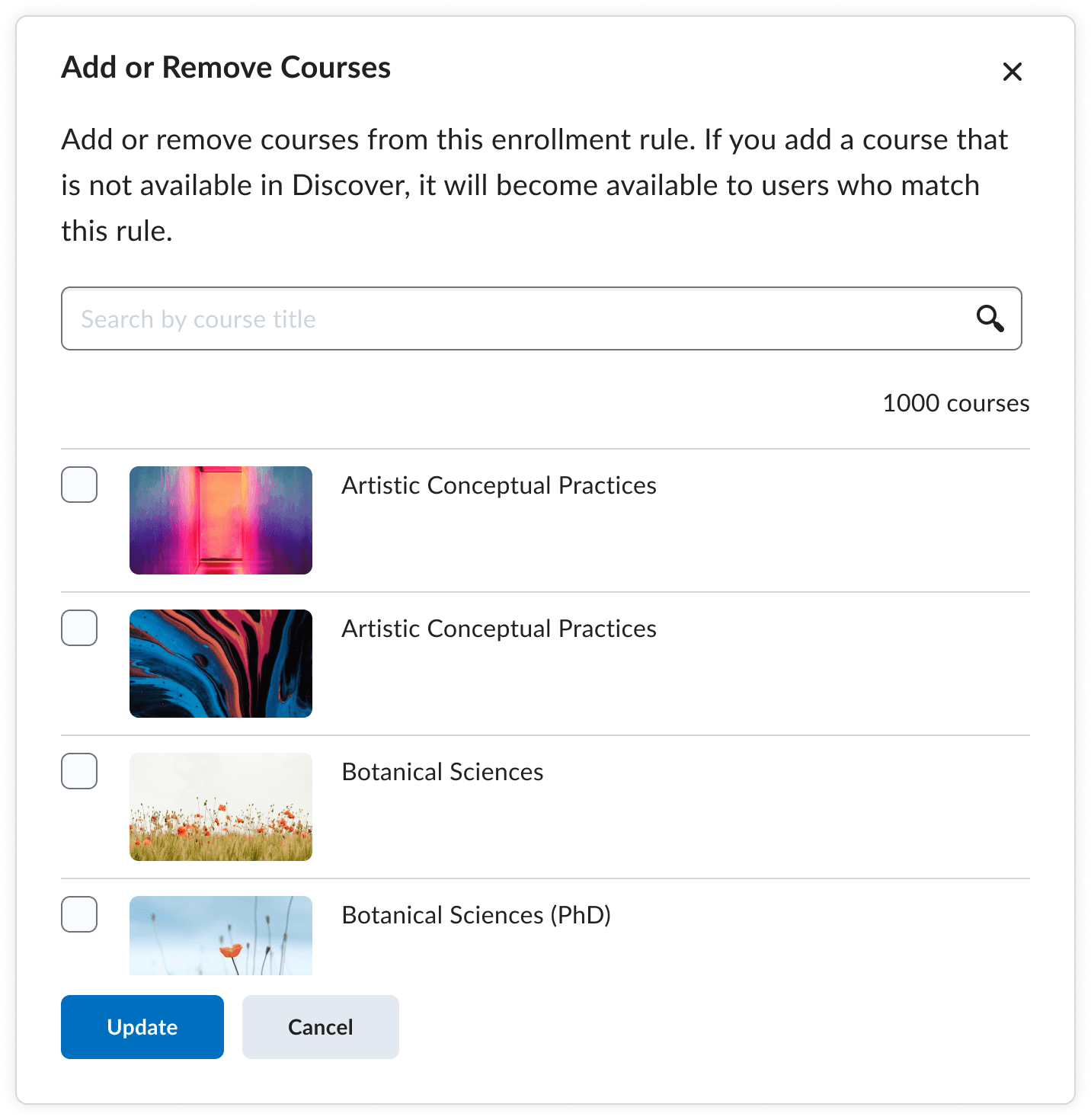
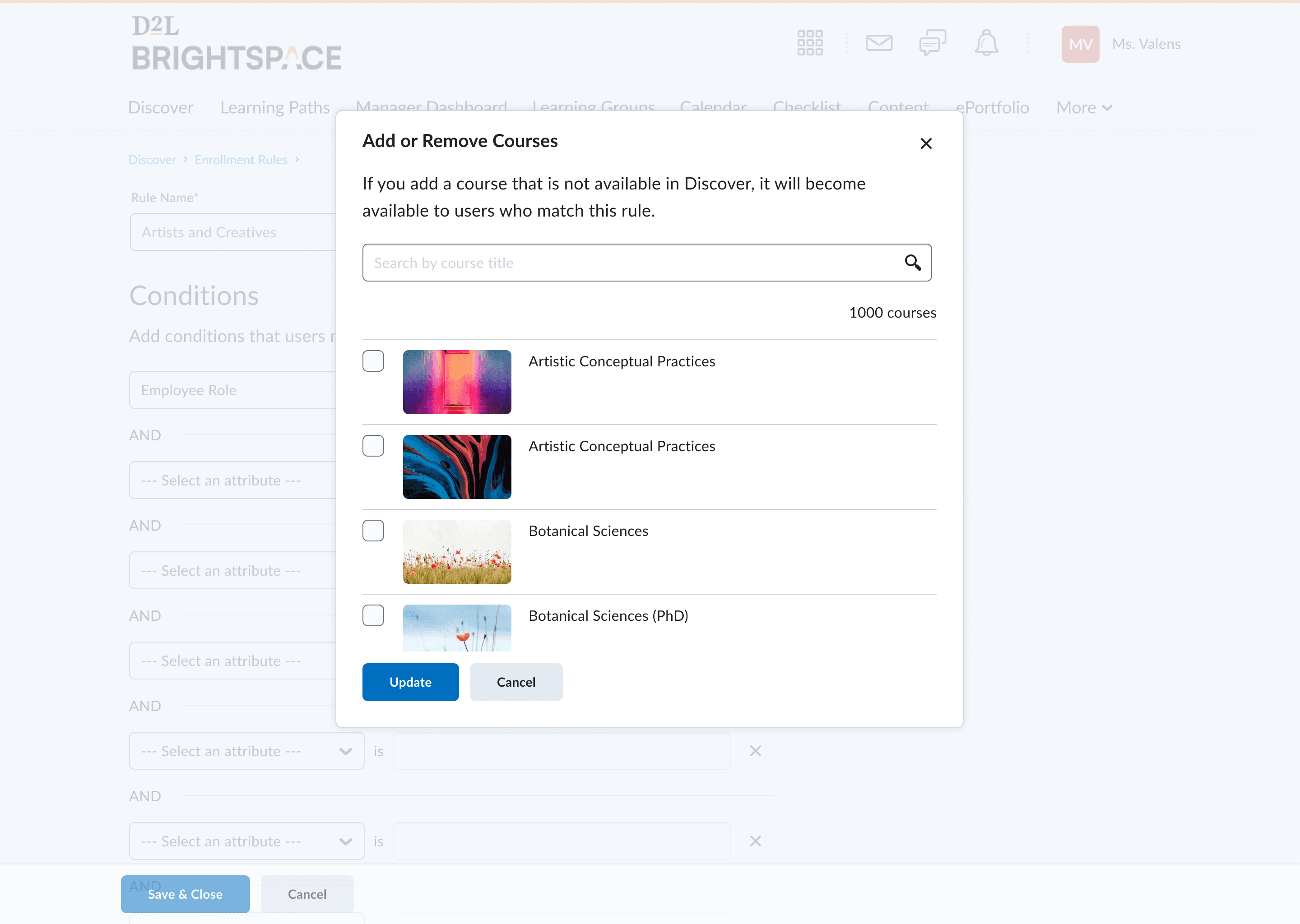
90% of both of these pages were design system components, and the purple box was re-used from the original Enrollment Rules workflow. The "Add or Remove Courses" dialog was completely re-used from another tool called Learning Paths.
My effort to focus on reusing front-end components was noticed and helped save development time. This effort also brought me credibility to push for crucial changes on the back end. The way we stored rules wouldn't work in the workflow I wanted to create. With some tough (and delicate) discussions, I was able to convince the team to create a rule builder instead of an entitlement builder. A rule builder was a little bit more work, but it would allow users to simply create rules and add them to courses (with the entitlement being created once it was added to the course), instead of having a multi-step workflow of creating an entitlement and then assigning that one entitlement to a course.
The Result: I had some strong, confident explorations to move forward with, and the most "user workflow breaking" technical constraints dealt with. The development team felt confident to move forward with the direction I was heading in, and I was able to dive into the high fidelity design.
Make: Detailed Figma hand-off and hands-on development support
Once I had some confident explorations to move forward with, I refined them and created a high-fidelity design hand-off spec. Every iteration, edge-case and meeting decision was documented here. I also encouraged developers to leave comments on the document whenever something needed to be clarified.
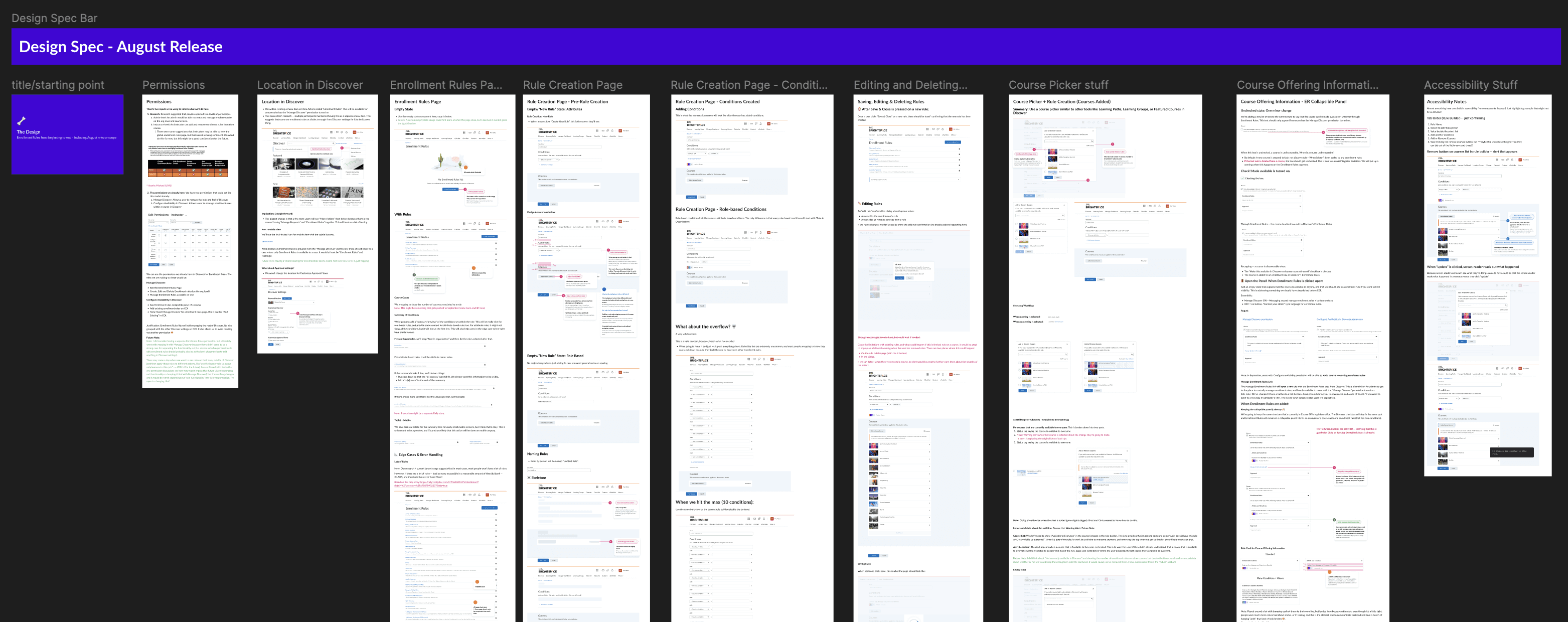
A large chunk of the design spec that I handed to developers. In this case, the development team was very "Figma savvy", so I was able to go pretty large and detailed with my design specifications. I adapt the way I create development specs depending on the development team. Since this spec, I've used videos, story explanations, or live meetings to communicate the same information written here.
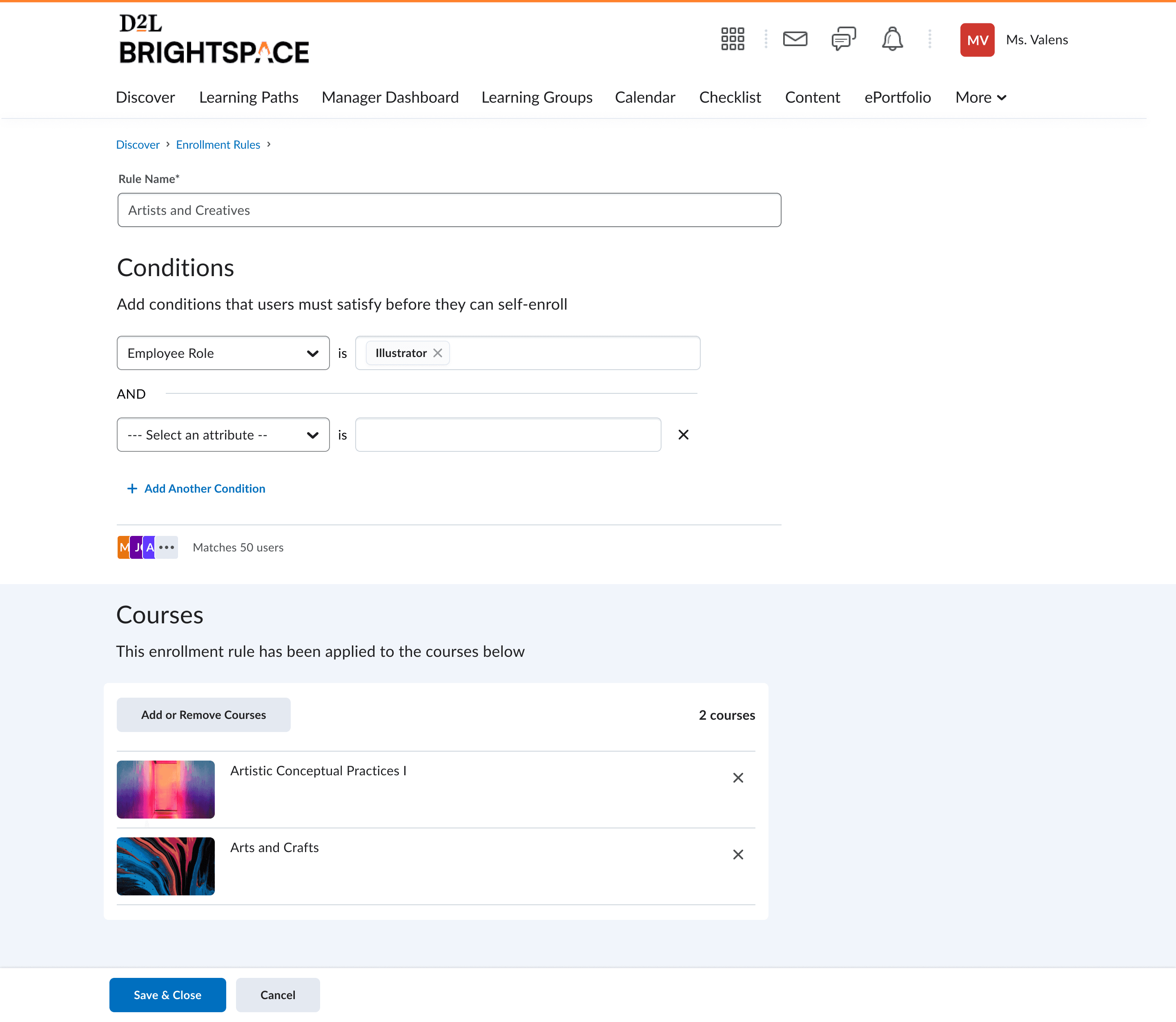
Below final design mock-up that was implemented and released in September, 2023.
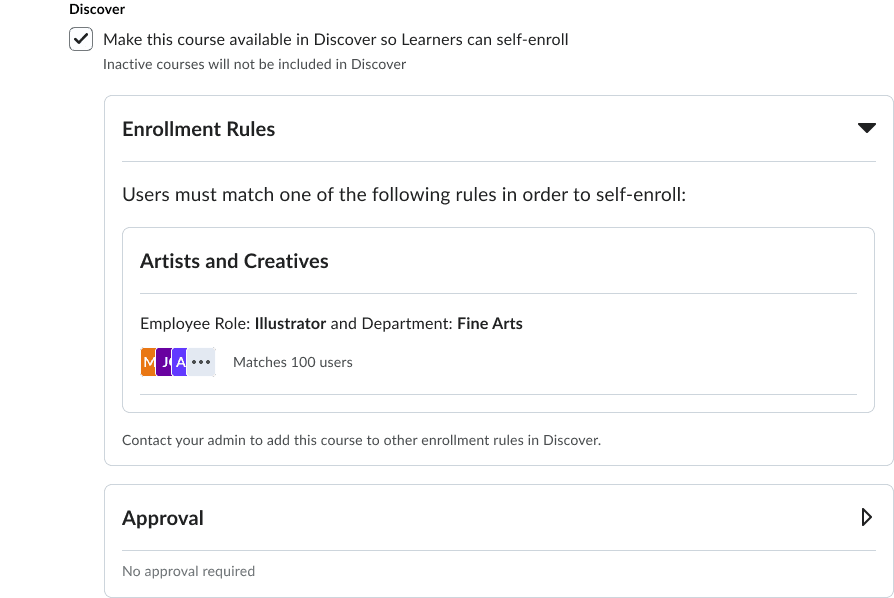
Slide 1: The rule creator with user-attribute based rules. The rule being created here is for Illustrator's, being applied to 2 courses in Discover.
Slide 2: The dialog of courses that can be applied to rules. There's a lot of inner-logic here to handle some technical constraints around courses available to everyone
Slide 3: Creating "role based" rules. This is the version for Brightspace clients that don't use user attributes (creating rules based on roles)
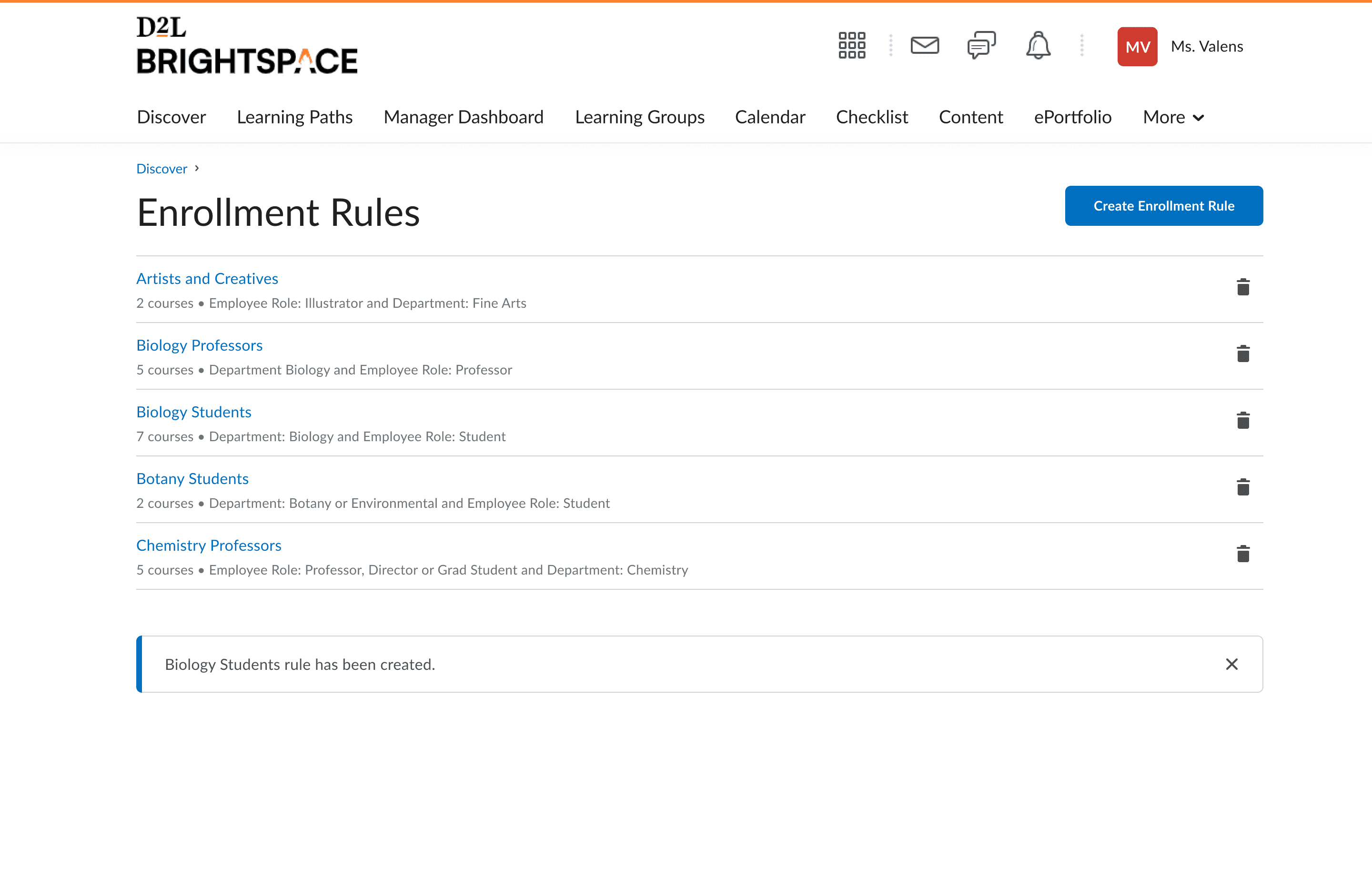
Slide 4: The rules list. Any of these can be applied to any course in Discover.
Slide 5: An instructor's view of the course that does not have the permission to add Enrollment Rules.
The Result: The design is done and implemented! Now to inform the client, ship it, and watch for results!
Enrollment Rules is shipped! Results, client response and usage of Discover
We released Enrollment Rules in September 2023. The client was happy and renewed their contract with Brightspace. We also saw steady growth in Discover and Enrollment Rules usage over the next few months, and the feature made it easier for European education providers to use Discover for course enrollment.
This project pushed me to get much more confident in understanding the system behind the experience, because in a workflow this technical, even one wrong assumption can throw the whole design off. The close collaboration with developers, product, and other designers was a huge part of making it work, and that level of system analysis is something I have brought into every project since.